
Troubleshooting
Symptom, cause, fix. If your problem is not here, the last section says what to include when you write to support so it gets resolved in one round-trip.
I cannot send anything
Four things gate sending. The panel names the missing one, but in order of how often it is the culprit:
Is your bot active?
Check Settings → Bots. Submitted, under review or needs-changes all mean no sending. See Managing bots.
Is the template approved?
Only approved templates appear in the broadcast composer. A template missing from the dropdown is a template that is not approved. See Templates.
Does the wallet cover it?
On prepaid, sending stops when the balance cannot cover the next message. See Wallet and billing.
Is the account suspended?
A suspension blocks new sends and states its reason on the dashboard. Reply to the suspension email.
If the panel says Today's spend limit of ₹5,000 is reached, the account's daily spend limit stopped the send. New broadcasts can start again after midnight, India time, or the owner can raise the limit on Settings → Pricing. See Daily spend limit.
The send would reach nobody
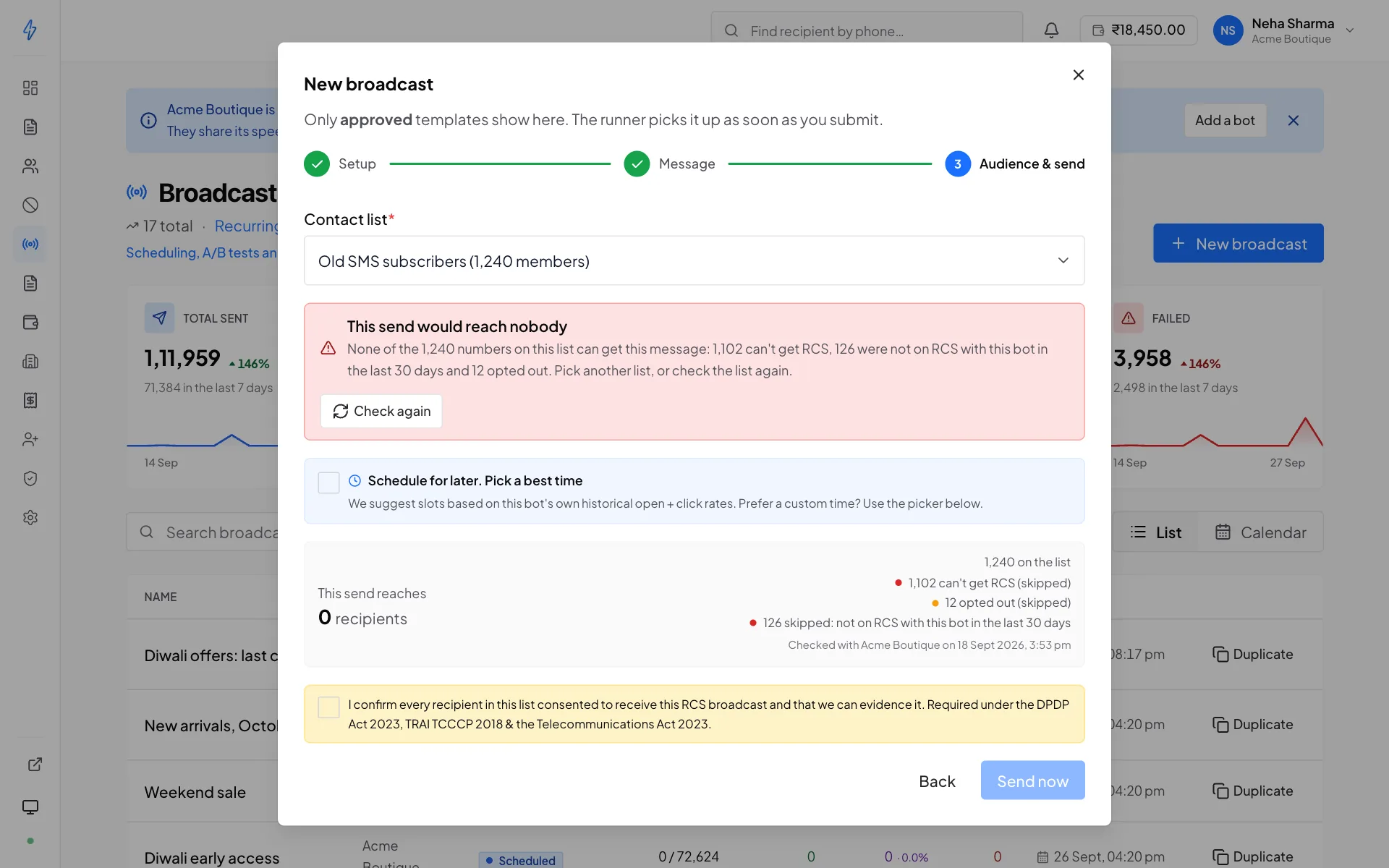
A broadcast never sends to people who opted out. Who else it sends to depends on the choice under Send to (see Who gets this send). With Can get RCS it also leaves out the numbers the list's check found can't get RCS, whichever of your bots made it, and the numbers the sending bot found not on RCS in the last 30 days. When the choice you picked reaches nobody, the composer shows This send would reach nobody, keeps the send button off, and says why:
Through the API the same case is refused with 400 no_reachable_recipients,
see Broadcasts.
Numbers never checked are still sent to
With Can get RCS, a Can't get RCS answer from the list's check keeps a number out, whichever of your bots made it and whichever bot sends, and a failure as not on RCS keeps it out of that one bot's broadcasts for 30 days. A number nobody has checked is sent to. A list that was never checked shows no choice and goes to every number except people who opted out. A check is optional, and a running check never stops you sending.
A broadcast went to fewer numbers than the list
The broadcast page says how many numbers were left out before sending, and why:
- On your opt-out list. They asked not to be messaged.
- Not reachable on RCS. The list's latest check found they can't get RCS.
- Not on RCS with this bot in the last 30 days. An earlier broadcast from the same bot failed on them because the phone is not on RCS. See Numbers not on RCS are skipped for 30 days.
None of them is messaged or charged. The last two apply only with Can get RCS. Numbers outside the choice you picked are not sent and not listed there either. The check counts for broadcasts from every one of your bots, not only the bot that ran it. See who a broadcast sends to.
Deliveries are failing
Open the broadcast. The Why messages failed card groups the failures by reason, with what to do about each, and the Recipients tab shows the reason for every number.
A big block of failures on a repeat promotional campaign
If the same list worked a month ago and mostly fails now, read the reason before blaming the list. The promotional cap and an unreachable number produce identical headline counts and completely different fixes. Sending rules and limits →
Do not rebuild a list of failures and resend to it
Most failures are unreachable numbers, not unlucky ones, resending fails again for the same reason and costs you the attempt. Run a reachability check on those numbers instead.
My template was rejected
The rejection carries a reason. The usual causes:
- Claims that cannot be substantiated, "guaranteed", "100% safe", "risk-free"
- Content that does not match its declared category, a promotion submitted as transactional
- A URL shortener that hides the destination
- Content outside the bot's approved message type
- Missing or misleading sender identity
Fix what the reason names and submit again. Templates cannot be edited after approval, so a change means a new template.
My template is stuck pending
Review usually takes seconds. A template sitting in needs admin review is waiting on a person at Splashify. That is a real state, not a stuck one, and it resolves within a working day.
If something has been plainly pending for hours, check the connection dot at the bottom of the sidebar. Grey means the panel is not receiving live updates, so the row may already have moved. Refresh the page.
My bot application was rejected
See the common rejection reasons table. In practice it is almost always one of: a URL that 404s, a company name that does not match the certificate, or an off-spec logo or banner.
You do not start over, the form reopens with your answers intact.
If the bot shows Rejected rather than Needs changes, there is no resubmit: that application was rejected for good. Contact support if you think that is a mistake.
A CSV import dropped rows
Rows are skipped when the number is not a valid mobile number, is duplicated within the file, or is already on the list. The import reports how many and why.
Pasted numbers follow the same rules. Before you continue, the box counts the ones that are not valid, will be skipped. See Pasting numbers.
Nine times out of ten it is the spreadsheet
Excel and other spreadsheet apps treat +919876543210 as a number, strip the +, and can render it as
9.19877E+11. Those numbers have lost digits and are reported as changed by Excel into a short
form. Format the phone column as text before pasting, or export straight from your source
system without opening the file.
Remove or download reachable numbers is not available
Remove N that can't get RCS, Download reachable numbers and New list from reachable act on the list's latest finished check. They are not available:
- while a check is running on the list. Wait until it finishes.
- when no check has finished: the list was never checked, or its last check failed or stopped. Run a check. A stopped one shows Resume.
- when there is nothing to act on, for example no number can get RCS.
- when your account has no active bot that supports number checks. See Number checks are missing.
Through the API they are refused with 409 check_in_progress or
409 no_finished_check, see Contact lists.
Number checks are missing
The Reachability column, the Check buttons, Keep only contacts that can receive RCS and the reachable number tools show only when your account has an active bot that supports number checks. Not every bot does.
- No check options anywhere. None of your active bots supports number checks. A check is optional: your broadcasts still go to every number except people who opted out, or to the choice you pick when an earlier check left answers. Numbers that cannot get RCS fail and are not charged.
- A bot is missing from the check dialog. The dialog lists only the bots that support number checks.
- A list you checked before now shows Not checked. That check was made with a bot that does not support number checks, so its answers are not used. Check the list again with a bot from the dialog.
- This bot cannot check numbers. Pick another bot. Pick a bot from the check dialog.
- Number checks need an active bot that supports them. Your account has no such bot right now. Contact support if you need one.
A check says my bot is not live
Your bot is not live on the network yet, so its numbers could not be checked. Your bot is approved, but the network has not finished turning it on, so it cannot answer for any number yet. Nothing on the list changed and no number was marked as unable to get RCS. Wait until your bot is live, then press Retry on the list. If it still says this a day after your bot went live, contact support.
Some numbers were left unchecked. Your bot is live on some networks and not yet on others, or the network did not answer for some numbers. Those numbers stay Not checked and are still sent to. Run the check again later.
Too many checks of big lists are running on your account. Two lists of 5,000 numbers or more are being checked already. Nothing on this list changed. Check it again when one of them finishes.
A menu item is missing
Wallet, Billing profile, Invoices, Team, API keys and the Audit log are owner-only and are hidden entirely for operators and viewers.
If a colleague cannot see a bot's data at all, check their bot scope on the Team page, scope is the usual explanation for two people seeing different numbers.
My webhook is not firing
Check the Event log
Settings → Event log shows every attempt and what your endpoint replied. If there is a row, we sent it, the status code and response tell you the rest. See Event log.
If there is no row, check the subscription
The endpoint is probably not subscribed to that event type. Open it under Settings → Webhooks.
If every attempt times out around 12 seconds
Your endpoint is too slow. Reply
200as soon as you have the payload and process afterwards.If you see a wall of 401s or 403s
A rotated signing secret that the consumer was never updated with.
Check the dead-letter queue
Anything there never reached you at all. Fix the cause, then replay.
My API calls return 403
Authentication and authorisation are separate gates. Read the code field:
A valid token that gets a 403 is not a broken token. See Authentication.
The balance did not move after I paid
Wait a few minutes and refresh, confirmation is occasionally delayed.
Do not pay again
Email [email protected] with the payment reference and amount instead. Paying twice creates a refund you then have to chase.
The bill is higher than expected
- A recurring broadcast fired more often than you remembered
- A contact list grew since you last looked at it
- You are comparing against a different bot's per-message price
Cost follows the delivered count, which the broadcast page shows alongside the targeted count.
Live counters are not updating
The dot at the bottom of the sidebar is the connection indicator. Amber means reconnecting; grey means offline or paused.
Nothing is lost either way, the send continues on the server and the numbers catch up when the connection returns. If it stays grey on a working network, a refresh usually fixes it.
Still stuck
Email [email protected]. Include:
- Your account email
- The bot name, if it is about a specific sender
- The broadcast id, if it is about a specific send
- The exact error text, a screenshot of the message, not a paraphrase
- When it happened, with the time zone
The exact error text matters more than anything else
Error messages here carry a specific reason and often a code. "It failed" starts a conversation;
the actual text usually ends one.