
API keys
An API key lets your own systems read from the RCS API without anybody's password in a config file. Create them under Settings → API keys.
Owner only
Only the account owner can see, create or revoke API keys. Operators and viewers do not see this screen.
When to use a key instead of a login
A key has no password to expire, no 2FA prompt, and can be revoked on its own without disturbing anyone's login.
Creating one
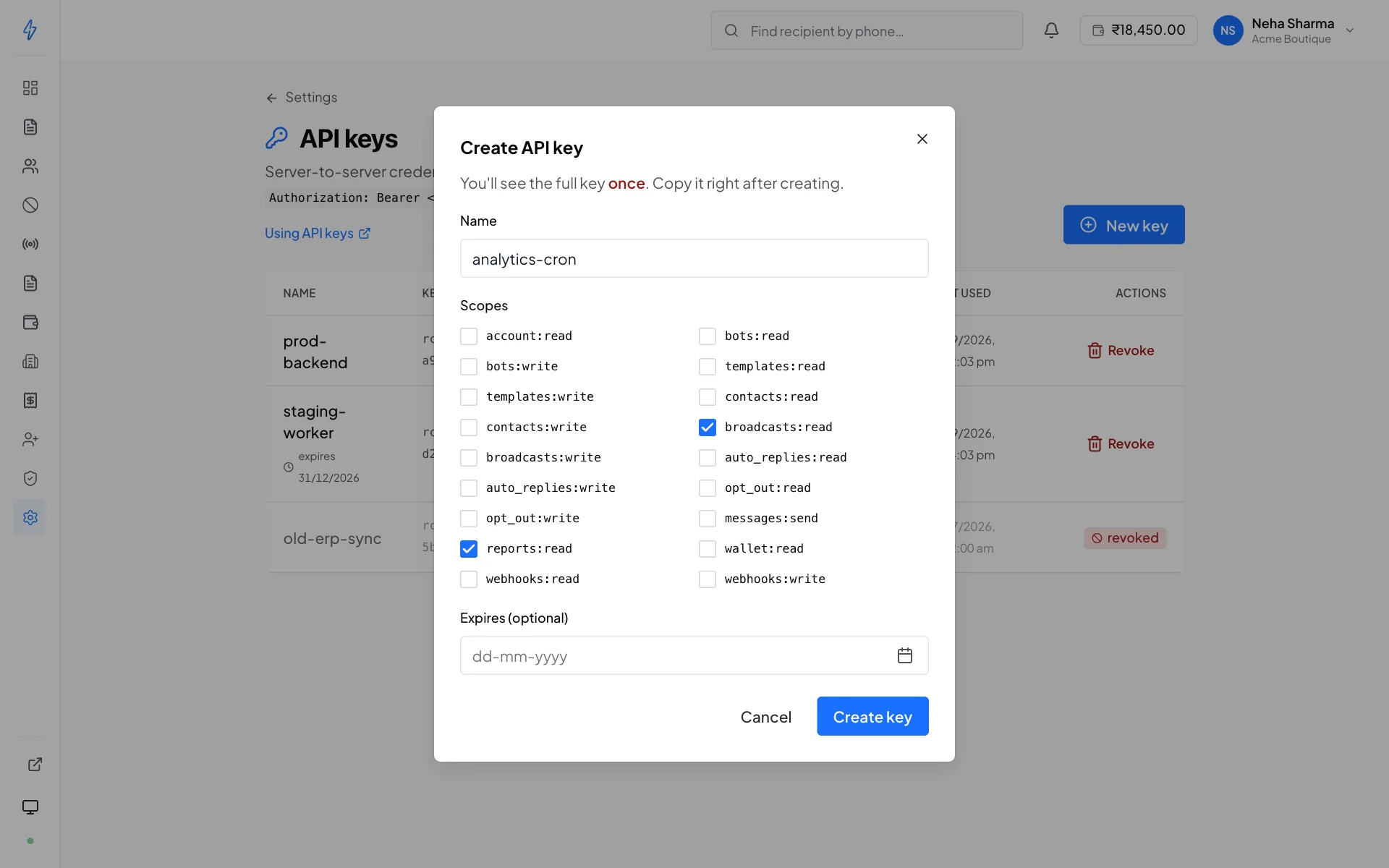
Name it after where it runs
prod-backend,analytics-cron,staging-worker, notkey1. When you later wonder whether revoking a dormant key is safe, the name is what tells you.Choose its scopes
Grant only what that service needs. Scopes are listed below.
Set an expiry, or don't
An optional hard expiry. Omit it for a key that lives until revoked.
Copy the key immediately
It is shown exactly once.
The key is shown once and never again
What Splashify stores is a hash plus the last four characters, enough to authenticate you and to label the row on this page, not enough to reconstruct the key. There is no “show key” button and support cannot recover it. Lose it and you revoke that key and create another.
Scopes
Grant the minimum. A key that can only read broadcasts cannot read your contact
lists: a request for anything the key does not carry a scope for is refused with
403 missing_scope, naming the scope it wanted.
A write scope covers the matching read. A key with broadcasts:write can read
broadcasts too, because a key that can start a broadcast and not check whether
it worked is not a useful thing to hold.
bots:read and templates:read are newer than the rest. Keys created before
they existed do not carry them, so if an older key starts getting
403 missing_scope on /rcs/bots or /rcs/templates, create a replacement key
with the scopes you want and revoke the old one.
What a key can do
Keys read and write. You choose per resource when you create one, so a key can be given exactly the reach its job needs: send messages and nothing else, or read delivery statistics without ever seeing a phone number.
Applying for a bot is included. A key with bots:write can submit an
application and upload its KYC documents, so onboarding a new sender does not
have to happen by hand.
Two limits are worth knowing before you design against them.
Some paths need contacts:read even though they hang off another resource.
Anything returning recipient phone numbers does: broadcast targets, auto-reply
fires, per-message reports and a recipient's history. That is what lets you
hand a vendor a delivery-statistics key without handing over your customer list.
Account security and money are never reachable by a key. No key can create another key, add a team member, turn off two-factor, change a password or trigger a wallet recharge, whatever scopes it carries. Those need a person signed in. See Authentication for the full table.
Seeing what is in use
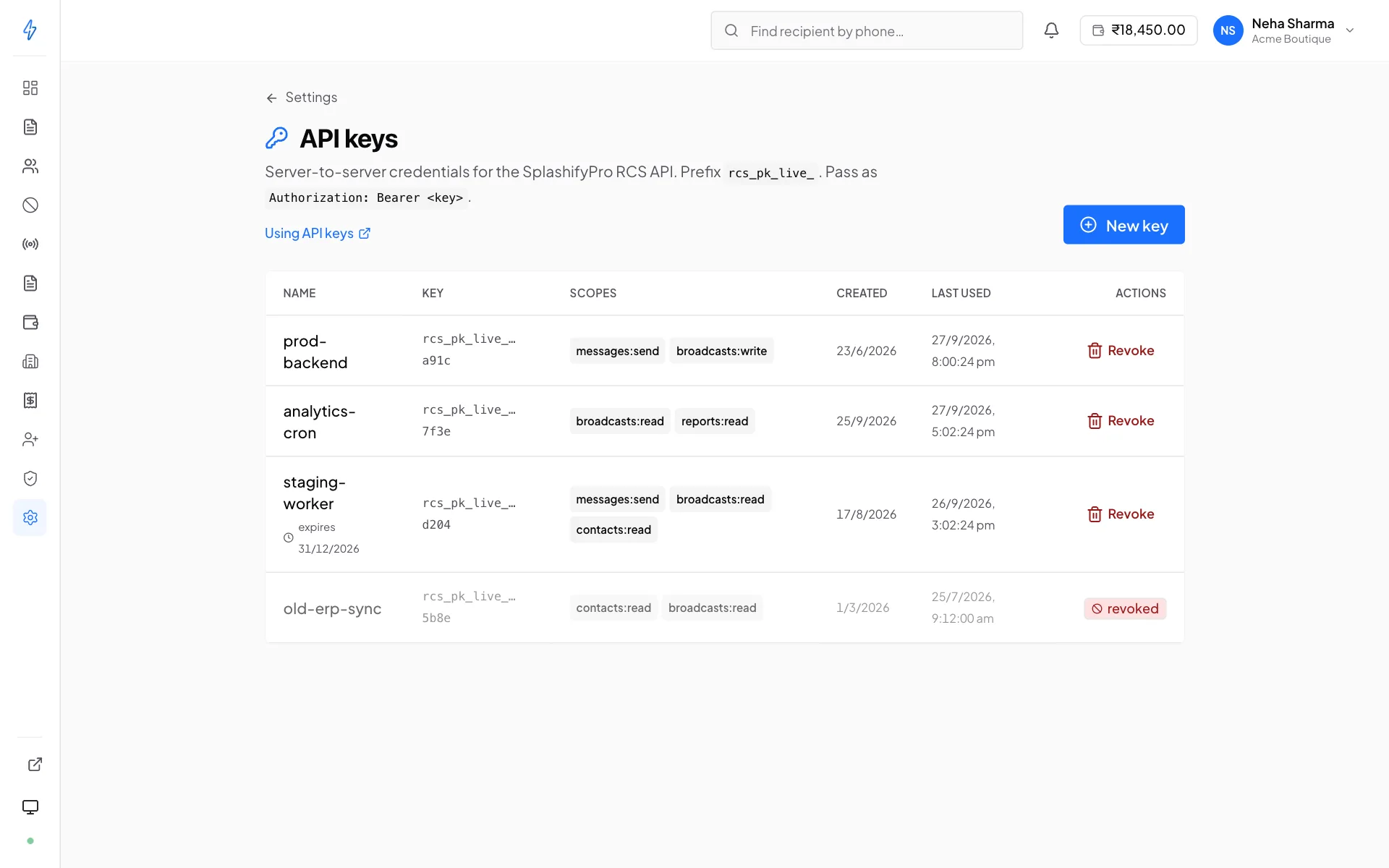
The key list shows, per key: its name, the last four characters, its scopes, when it was created, its expiry if it has one, and last used, the most recent time it authenticated a request.
Last-used is the field that makes cleanup safe. A key whose last-used has not moved in weeks is a candidate for revocation.
Last used is debounced
It is written at most once a minute per key, so a key hammering the API and a key making one call a minute look the same here. It answers “is anything still using this?”, not “how much?”.
Rate limits
Each key gets its own budget of 300 requests per second. Exceeding it returns a rate-limit error with a retry hint.
Because the budget is per key, giving each service its own key means a runaway script in one cannot starve the others. That alone is a good reason not to share one key across your estate.
Revoking
Revoking takes effect on the very next request. There is no cache to wait out. The row stays visible, marked revoked, so the audit trail survives.
Revoke immediately if a key has been committed to a repository, pasted into a ticket or chat, or belonged to a service that has been decommissioned.
Rotating a key
Both keys are valid at once, so no downtime window is needed:
Create the replacement
Same scopes, a new name. Copy the key.
Deploy it
Push it to your secret store and roll your servers. Requests keep succeeding on either key throughout.
Wait for the old key to go quiet
Watch its last used. Once it stops advancing, nothing is still calling with it. Give it a few minutes, the field is debounced.
Revoke the old key
Now it is safe.
Rotate on a schedule, not after an incident
A rotation you have practised is a ten-minute job. A rotation you are doing for the first time because a key leaked is not.
Keeping keys safe
- Never in client-side code. A key in a browser bundle or a mobile app is public. Proxy through your own backend.
- Never in the repository. Use your platform's secret store.
- Never in a ticket or chat message. They are searchable and long-lived.
- One key per service. Separate rate budgets, and revoking one does not take down the rest.