
Recurring broadcasts
A recurring broadcast is a schedule that creates a real broadcast each time it fires. Set it once instead of remembering to send the weekly digest every Monday.
Find them under Broadcasts → Recurring. Operators and owners can create and control them; viewers can read.
What it does
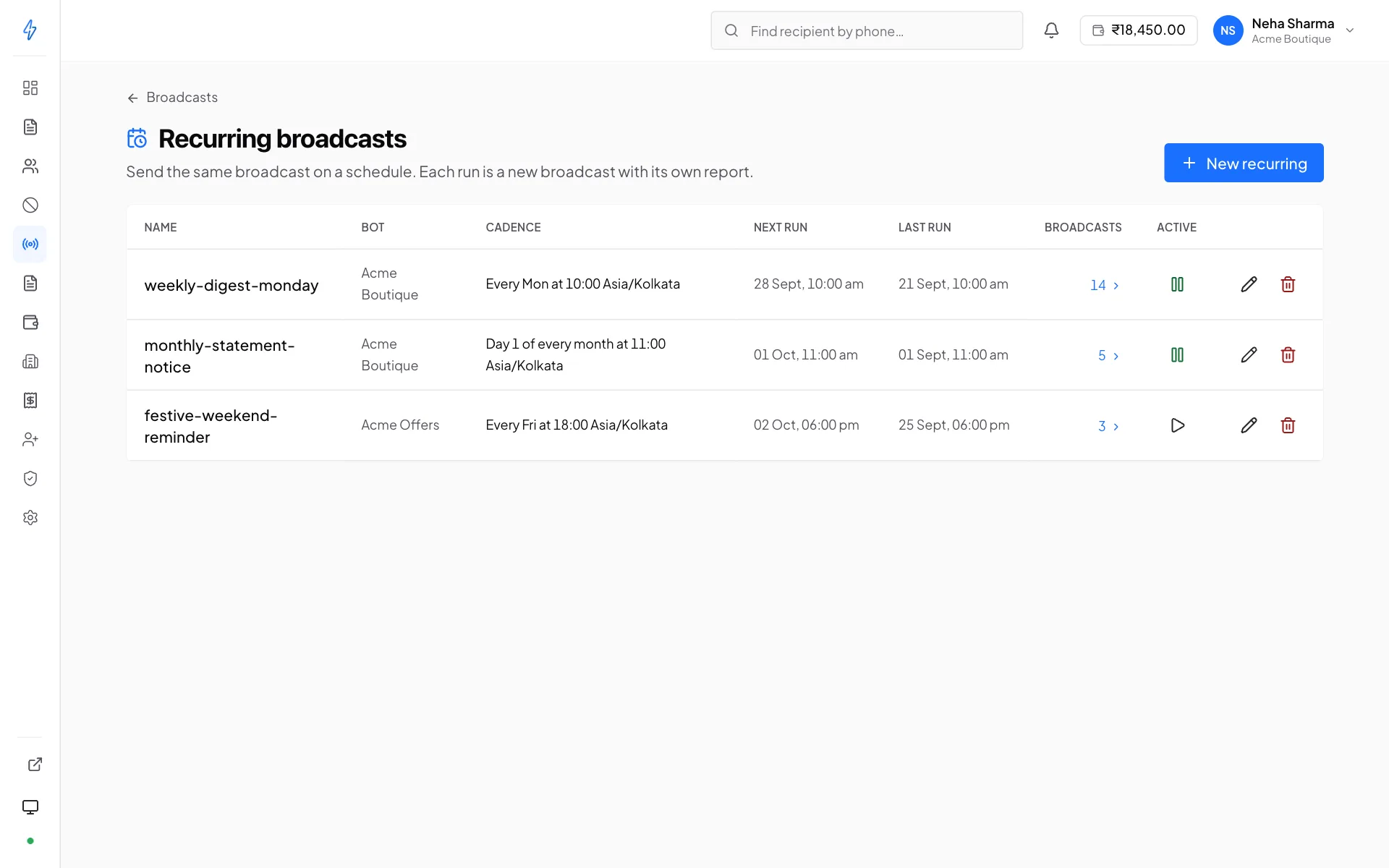
A recurring broadcast holds a bot, a template, a contact list, who it sends to and a cadence. Each time the schedule fires it creates a normal broadcast and runs it, which means every run gets its own counters, its own targets view and its own row in your reports, exactly like one you created by hand.
The list is read fresh at each run
A schedule points at a contact list, not at a snapshot of its members. Anyone added to the list since the last run is included in the next one, and anyone removed is not. That is usually what you want, a "new customers this week" list stays current on its own.
Promotional bots only
A recurring definition is a broadcast generator, so it takes the same rule: the bot must be registered Promotional. See What your bot is registered to send.
This is also re-checked on every run, not just when you save. If a bot's registration is later corrected to Transactional or OTP, the schedule stops producing sends rather than producing sends that breach it, the schedule itself stays where it is for you to repoint or delete.
Creating one
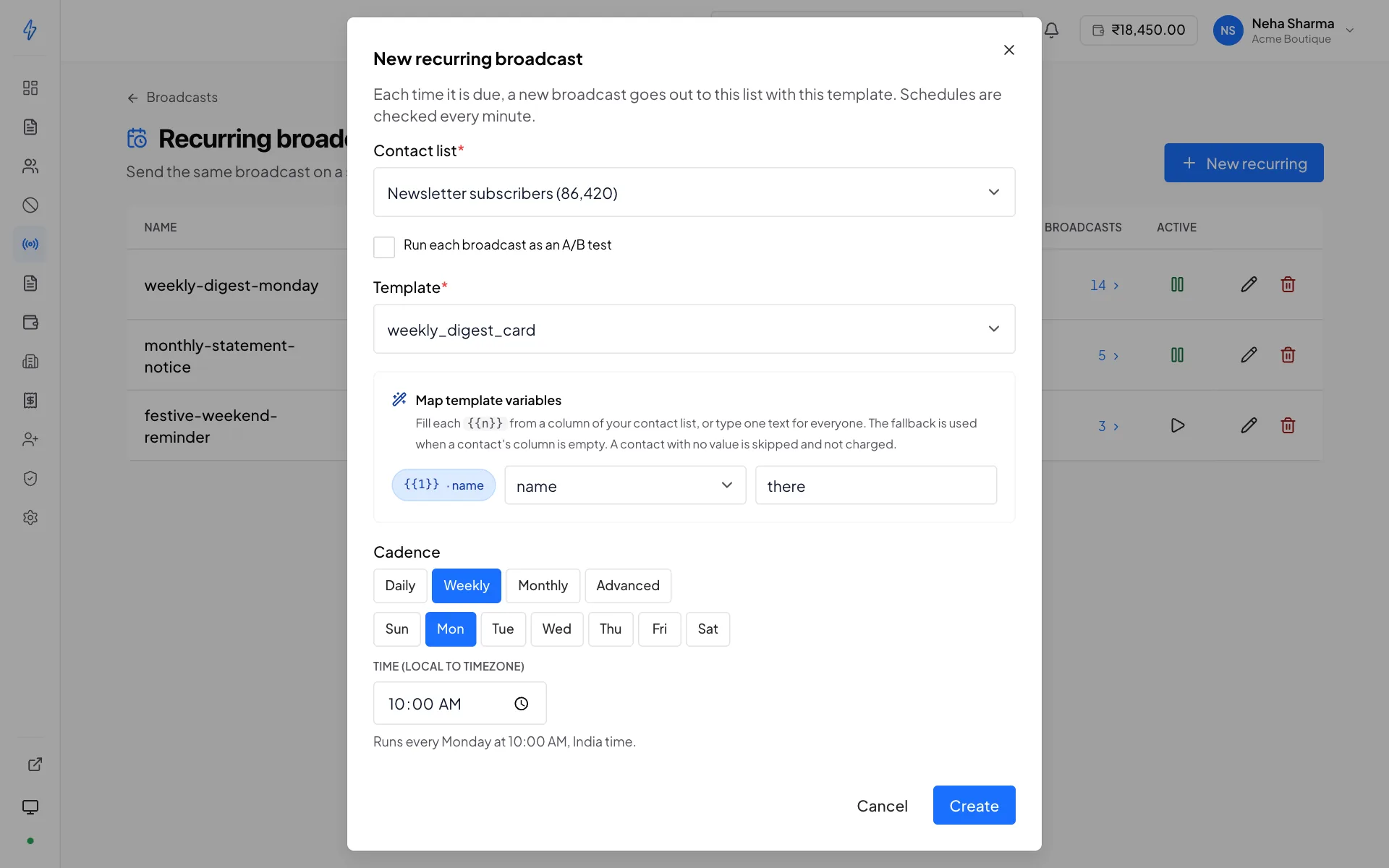
Name it
Something that says what it is and how often,
weekly-digest-monday, notrecurring 2.Pick the bot, template and contact list
Same choices as a normal broadcast. The template must be approved.
Pick who it sends to
Under Send to, pick Can get RCS, Cannot get RCS or All numbers, the same choices as a normal broadcast (see Who gets this send). Each card shows how many numbers it sends to today. Each run counts the list again when it goes out. When the list has not been checked, no choice shows: each run goes to all numbers on it, also after the list is checked later. Edit the schedule to pick again. Opted-out numbers are never sent.
Map the template's variables
If the template has variables, point each at a column from the contact list and give it a fallback. The mapping is stored on the schedule and applied to every run it generates, so a recurring send substitutes exactly as the same broadcast sent by hand would.
Set the cadence
How often it fires, and at what time of day. The line under it says the schedule in words, for example "Runs every Monday at 10:00 AM, India time."
Save
It becomes active immediately and fires at the next matching time.
Variables on a schedule
A recurring definition is a broadcast generator, so it needs the same variable
mapping a one-off broadcast needs. Point each {{n}} at a contact-list column,
and give it fallback text for the recipients where that column is empty.
Each run reads the list as it stands at the moment it fires, so a contact added on Tuesday gets Wednesday's run with their own values. The mapping itself is fixed until you edit the schedule.
Per variable, per recipient, in order:
That last row is the one to avoid. A schedule with no mapping skips everyone on the list, every time it fires.
Set a fallback on anything that can be blank
A one-off broadcast shows you a preview built from a real member before you send it. A schedule fires unattended, so nobody is watching when a blank column reaches a customer. Give every variable a fallback that reads correctly on its own.
A/B schedules do not take a mapping
The two variants can declare different variables, so one mapping cannot honestly describe both. Use single-template mode when you need variables.
Time zone
Schedules run in India Standard Time
Every recurring broadcast fires on IST, regardless of where you or your recipients are. There is no per-schedule time zone setting. If you need a send timed to a different zone, work out the IST equivalent, and remember that a zone observing daylight saving will drift against IST twice a year, so a schedule set for 9am local will land an hour out for half of it.
If you genuinely need a different zone, contact support rather than working around it with an offset you will forget about.
Pausing and resuming
Pause stops a schedule firing without deleting it. Its history and its configuration stay intact, and Resume restarts it from the next matching time. It does not backfill runs that were missed while paused.
Pause is the right tool for a seasonal campaign, a service incident, or a content freeze. Deleting is for schedules you will never want again.
Reading past runs
Open a schedule to see the broadcasts it has produced, newest first, each with its delivery counters. Any of them can be opened as a normal broadcast, with the full targets view.
This is the fastest way to spot a schedule quietly degrading, a weekly digest whose delivered count has been sliding for a month is usually a contact list going stale rather than anything wrong with the send.
Things worth knowing
- A run still needs a working account
A schedule that fires against a suspended bot, an insufficient wallet balance, or a deleted template produces a failed run with the reason attached. It does not retry on its own, and it does not pause itself, the next occurrence will try again.
- Opt-outs are applied at each run
Every run filters against the account opt-out list at the moment it fires, so someone who opts out between runs is excluded from the next one automatically.
- A run with nobody to send to is skipped
Each run counts the list again for the schedule's choice. If it reaches nobody (everyone on the list opted out, no number can get RCS with Can get RCS, or no number is marked as cannot get RCS with Cannot get RCS), that run is skipped and no broadcast is made. The schedule stays on and tries again at its next time. How checks work. With Can get RCS, each run also skips the numbers its bot found not on RCS in the last 30 days.
- The daily spend limit skips a run
A run that falls due after today's spend limit was reached is skipped, or, if it was already set up, it says Not started and sends nothing. The schedule stays on and runs again at its next time.
- Deleting the template breaks the schedule
The schedule points at a specific template. Deleting that template leaves the schedule with nothing to send. If you are replacing a template, edit the schedule to point at the new one before deleting the old.
- Cost is per run
Each run charges for its own messages the network accepts, less any that fail after that. A weekly schedule against a 10,000-member list is up to a 10,000-message bill every week, worth doing the arithmetic before saving.