
Broadcasts
A broadcast pairs one approved template with one contact list.
The API kicks off the send when its status is running (immediate)
or scheduled + the scheduled time has passed.
Team-member access: operators can call every endpoint on this page as long as the target
bot_idis in their assigned bot set; viewers get403 not_operatoron any mutation and see only their assigned bots on the list/get paths. See the Team members reference for the role matrix.
POST   /api/v1/rcs/broadcasts
GET    /api/v1/rcs/broadcasts
GET    /api/v1/rcs/broadcasts/{id}
POST   /api/v1/rcs/broadcasts/{id}/start
POST   /api/v1/rcs/broadcasts/{id}/send-now
POST   /api/v1/rcs/broadcasts/{id}/cancel
GET    /api/v1/rcs/broadcasts/{id}/targets
GET    /api/v1/rcs/broadcasts/{id}/failure-reasons
POST   /api/v1/rcs/broadcasts/{id}/remove-not-on-rcs
GET    /api/v1/rcs/broadcasts/{id}/button-taps
POST   /api/v1/rcs/broadcasts/{id}/retarget
The bot must be registered for promotional traffic
Every endpoint on this page that puts messages on the carrier, create, start, send now, retarget, and both write endpoints on recurring broadcasts, first checks what the bot is registered for with the carrier.
{
  "success":      false,
  "code":         "bot_not_promotional",
  "message":      "\"Acme Orders\" is registered with the carrier as a Transactional bot, so it cannot run broadcasts. …",
  "bot_use_case": "transactional",
  "use_instead":  "POST /api/v1/rcs/messages/send"
}
Branch on code, not on the message text. use_instead names the endpoint to
call for this bot's traffic, a Transactional or OTP bot keeps full use of
send message, test sends and auto-replies; only
bulk fan-out is refused.
GET /rcs/bots returns a can_broadcast boolean per bot so you can filter
before you build a request. Read that flag rather than deriving the rule from
use_case yourself, the flag is where the rule actually lives.
The check runs again at start and send now, not only at create: a draft can outlive a correction to the bot's registration, and start is what actually sends. It is evaluated before any wallet reservation, so a refusal never leaves funds held.
Status lifecycle
draft  →  scheduled  →  running  →  completed
                              ↘    ↘
                              cancelled
failed- draft, created but not yet sendable. Call
/startto flip it. - scheduled,
scheduled_atis in the future; the send starts automatically when the time arrives. - running, actively sending.
- completed, every target has settled (sent, delivered, read, or failed). Fires the "Broadcast finished" email.
- cancelled. You called
/cancel. Messages already sent stay charged, except any that fail after that, which are refunded; the hold for the rest is returned. - failed, the send couldn't proceed (missing credentials, empty
wallet, missing template). A scheduled broadcast that fell due after
today's spend limit was reached also ends here, with
status_reason: "spend_limit_reached", see Daily spend limit reached.
Create
POST /api/v1/rcs/broadcasts
{
  "name":         "May launch announcement",
  "bot_id":       "e8bb61e0-8500-11ef-9c9a-4bc60d7a1e2f",
  "template_id":  "1f7a…",
  "list_id":      "a1b2…",
  "audience":     "rcs",
  "scheduled_at": "2026-05-28T08:00:00Z"
}
audience is optional and says who on the list the broadcast sends to:
Opted-out numbers are never sent in any choice. Spaces around the value and its case do not matter. Any other value is refused with HTTP 400:
{
  "success": false,
  "code":    "invalid_audience",
  "message": "audience must be rcs, not_rcs or all"
}
A check is optional. On a list that was never checked, rcs and all
both send to every number that has not opted out (rcs still skips the
30-day not-on-RCS numbers), and not_rcs is refused as
none_cannot_get. See Reachability
filter.
bot_id selects the sender bot for this broadcast. It must be an
active bot owned by the calling account. When omitted, the request
falls back to the caller's default bot for one release cycle. See
the Bots reference for how to list your bots and pick a
bot_id.
Only an active bot may broadcast. Anything else, including a
processing bot whose carrier approval is still open, returns
HTTP 403.
The check runs on every path that can start a fan-out, not just this
one: /start, /send-now, /retarget and the recurring endpoints all
re-read the bot at the moment they run. A broadcast drafted while a bot
was active cannot be started later on one that no longer is.
{
  "success": false,
  "code":    "bot_not_active",
  "message": "This bot is not active. Wait for admin activation or pick another bot."
}
scheduled_at is optional. Omit it (or send a past timestamp) and
the broadcast runs as soon as you call /start.
The template must be in effective_status = approved, otherwise the
endpoint returns 403.
Account-suspended block
If your account status is suspend, this endpoint returns HTTP 403
with:
{
  "success": false,
  "code":    "account_suspended",
  "message": "Account suspended. <reason>. Reply to your suspension email to discuss."
}
The rest of the panel (templates, contact lists, invoices, past broadcasts) stays fully accessible while suspended. Only new sends are blocked. When the suspension is lifted, an "Account reactivated" email fires and this endpoint accepts again.
Response:
{
  "success":       true,
  "broadcast_id":  "b1b2…",
  "total_count":   18324,
  "audience":      "rcs",
  "status":        "draft",
  "template_name": "order_shipped",
  "list_name":     "May launch, opted in"
}
total_count here is how many numbers the audience sends to, counted
at Create. When the recipients are prepared it becomes the number
written for sending.
Nobody to send to
Before it saves anything, Create counts who the broadcast would reach
from this bot for its audience, with the same rule the send uses (see
Reachability filter). When that reaches nobody,
Create answers HTTP 400. Nothing is saved and no money is held:
{
  "success": false,
  "error":   "no_reachable_recipients",
  "code":    "no_reachable_recipients",
  "reason":  "all_unreachable",
  "message": "None of the numbers on this list can get RCS messages. Pick another list."
}Branch on code, and on reason for your own wording. To know before
you call Create, ask the
audience endpoint:
choices has the count for each audience, and its reason is the one
Create would give for rcs.
all_unreachable can come from a check made with any of your bots,
and only a bot that supports number checks can make one. It applies to
a broadcast from any of your bots, including one that cannot check
numbers. It is also the reason when every number left failed as not on
RCS with this bot in the last 30 days (see Reachability
filter). A list never checked is sent to every
number that has not opted out. If the count cannot be made, Create is
not refused; the send still applies the same rule for its audience
when the recipients are prepared.
Daily spend limit reached
When the account owner has set a daily spend limit and today's spend has reached it, Create, Start and Send now answer HTTP 409 before the broadcast itself is checked. Nothing is saved, started or held:
{
  "success":     false,
  "error":       "spend_limit_reached",
  "code":        "spend_limit_reached",
  "message":     "Today's spend limit of ₹5,000 is reached. New broadcasts can start again after midnight, or the account owner can raise the limit in Settings.",
  "daily_limit": 5000,
  "today_spend": 5012.4,
  "resets_at":   "2026-09-27T18:30:00Z"
}Which calls it refuses:
A broadcast that is already running is never stopped, so a day's spend
can pass the limit. A scheduled broadcast that has never sent and falls
due while the limit is reached does not start: it ends failed with
status_reason: "spend_limit_reached", nothing is sent, and a prepaid
hold is released. Send it again with a new Create.
The limit guards your budget, so a read that fails lets the call through rather than refusing a send.
Personalisation: variables and fallbacks
If the template contains {{1}}, {{2}}, … variables, attach a
param_map to the Create request so each recipient gets their own
values:
POST /api/v1/rcs/broadcasts
{
  "name":        "May launch announcement",
  "bot_id":      "e8bb61e0-…",
  "template_id": "1f7a…",
  "list_id":     "a1b2…",
  "param_map": [
    { "index": 1, "column": "name",     "fallback": "there"    },
    { "index": 2, "column": "order_id", "fallback": ""         },
    { "index": 3, "column": "",         "fallback": "DIWALI20" }
  ]
}
Each entry fills one template variable:
Every variable needs an entry with a column or a fallback. If one
is missing, Create is refused:
{
  "success": false,
  "code":    "param_map_required",
  "field":   "param_map",
  "message": "Fill every template variable: {{2}} has no column or fallback."
}
Per recipient, each variable takes the column's value, or the fallback
when the column is empty. A recipient that still has no value (empty
column, empty fallback) is skipped: the target is marked failed with
a failure_reason such as No value for {{2}} in the message text, and it
is not charged. The same happens when a value pushes a field over its limit
(for example a card title over 200 characters).
Variables are filled in the message text, card titles and descriptions, suggestion labels, and at the end of a suggestion URL, where the value is URL-encoded.
Header image override
On bots that support it, you can swap the header image for this one broadcast without recreating the template. On other bots the field is ignored:
{
  "name":               "May launch announcement, variant B",
  "template_id":        "1f7a…",
  "list_id":            "a1b2…",
  "image_override_url": "https://cdn.example.com/promo-may.png"
}
The override replaces the template's first mediaUrl for every
message on this broadcast.
Preview
POST /api/v1/rcs/broadcasts/preview
{
  "template_id":        "1f7a…",
  "list_id":            "a1b2…",
  "param_map":          [ … same shape as Create … ],
  "image_override_url": "https://cdn.example.com/promo.png"
}
Returns up to three sample renders, one per real recipient, so a UI or an automated test can show exactly what a recipient will receive before the broadcast is saved:
{
  "success":  true,
  "provider": "jiocx",
  "previews": [
    {
      "phone":      "+919876543210",
      "components": { "type": "text", "text": "Hi Asha, your order 1234 has shipped. Use DIWALI20 on your next order." }
    },
    {
      "phone":      "+919876543211",
      "components": { "type": "text", "text": "Hi there, your order {{2}} has shipped. Use DIWALI20 on your next order." }
    }
  ]
}
A preview that still shows a {{n}} is a recipient with no value for that
variable. At send time that recipient is skipped and not charged.
Lists with zero members return one all-fallback preview so the caller can still see the layout.
Start
POST /api/v1/rcs/broadcasts/{id}/startReturns { "success": true, "status": "running" } (or scheduled if
scheduled_at is still in the future).
While the broadcast is draft or preparing, Start counts its
audience again, since the list may have changed after Create. A send
that reaches nobody is refused with the same 400 no_reachable_recipients
as Create, before any wallet hold.
A prepaid broadcast holds money for the sends when it starts. A broadcast
still preparing holds the count of its audience, made fresh at Start.
While a check on the list is running, it holds the count of every number
that has not opted out instead, since the check can still move numbers
into the choice. A check that stopped part way changes nothing more, so
it holds the count of its audience. A broadcast whose recipients are
already prepared holds its total_count. What is not used returns when
the broadcast ends. A check never blocks Start: the send uses the answers
saved when its recipients are prepared.
Once today's spend
limit is reached, Start is refused with
409 spend_limit_reached, unless the
broadcast is scheduled for a later day.
Send now (override a scheduled broadcast)
POST /api/v1/rcs/broadcasts/{id}/send-nowFlips a scheduled broadcast to running immediately, ignoring
its scheduled_at. The send starts within seconds.
Rules:
- Only valid on broadcasts currently in
scheduledstatus. Any other state returns HTTP 409. - Blocked for suspended accounts with
account_suspended(same shape as Create). - Refused with
409 spend_limit_reachedonce today's spend limit is reached. - No email fires on send-now itself. You'll get the usual "Broadcast finished" summary when it completes.
Response:
{ "success": true, "status": "running", "message": "Broadcast queued to send immediately." }Cancel
POST /api/v1/rcs/broadcasts/{id}/cancelRefuses with 409 if the broadcast is already in a terminal state.
List + get
GET /api/v1/rcs/broadcasts?size=50
GET /api/v1/rcs/broadcasts/{id}
The list is newest first, by when each broadcast was created. It
returns size rows (default 50, max 200) in broadcasts, and while
there are more, next_cursor and has_more: true. Pass next_cursor
back as cursor for the next page; the order holds across pages. The
newest 50,000 broadcasts can be paged through. A read that fails answers
503 broadcasts_unavailable; try again.
Get answers { "success": true, "broadcast": { … } }. Each row carries
the live counters:
{
  "broadcast_id":    "b1b2…",
  "name":            "May launch announcement",
  "status":          "running",
  "total_count":     18324,
  "sent_count":      8124,
  "delivered_count": 7812,
  "read_count":      4103,
  "clicked_count":   612,
  "failed_count":    12,
  "optout_skipped_count":      77,
  "unreachable_skipped_count": 240,
  "ctr":             7.83,
  "started_at":      "2026-05-28T08:00:01Z",
  "created_at":      "2026-05-28T07:58:40Z"
}
Get also returns not_on_rcs_skipped_count, status_reason and
audience (rcs, not_rcs or all; broadcasts created before the
field read rcs):
{
  "broadcast_id":             "b1b2…",
  "not_on_rcs_skipped_count": 36,
  "status_reason":            "",
  "audience":                 "rcs"
}
status_reason says why a rule ended the broadcast on its own. It is
"" for almost every broadcast, and "spend_limit_reached" for a
scheduled one that fell due after today's spend limit was reached.
Counters update in real time from delivery webhooks.
When the broadcast was created with a param_map and/or a header
image override, both come back on Get too:
{
  "broadcast_id":       "b1b2…",
  "param_map": [
    { "index": 1, "column": "name",     "fallback": "there"    },
    { "index": 2, "column": "order_id", "fallback": ""         },
    { "index": 3, "column": "",         "fallback": "DIWALI20" }
  ],
  "image_override_url": "https://cdn.example.com/promo.png"
}
Broadcasts without these fields simply omit them.
Counter guide
Numbers left out because they are not in the audience (for example the
reachable numbers of a not_rcs broadcast) have no counter.
CTR, click-through rate
Each row carries ctr: clicked_count divided by delivered_count,
times 100, and 0 when nothing was delivered. The same figure
client-side:
const ctr = row.delivered_count > 0
  ? (row.clicked_count / row.delivered_count) * 100
  : 0;
Notes:
- CTR is computed against delivered (not sent), failed sends never suppress the rate.
clicked_countcounts each person once per broadcast, however many times they tap, so repeated taps don't inflate the rate. Every tap is counted per button on Button taps.- If you post templates via the API with your own
postbackvalues, keep each one short plain text (up to 90 characters). No marker is needed: the value is sent exactly as you save it. - Delivery rate can be computed the same way:
(delivered_count / sent_count) * 100. - Read rate:
(read_count / delivered_count) * 100.
Targets
GET /api/v1/rcs/broadcasts/{id}/targets?size=200Returns up to size recipient rows (default 200, max 1000):
{
  "success": true,
  "targets": [
    {
      "recipient_phone": "+919876543210",
      "state":           "sent",
      "sent_at":         "2026-05-28T08:00:02Z",
      "delivered_at":    "2026-05-28T08:00:03Z",
      "read_at":         "2026-05-28T08:07:41Z",
      "failure_reason":  ""
    },
    {
      "recipient_phone": "+919876543299",
      "state":           "failed",
      "failure_reason":  "Recipient has opted out of RCS, Remove them from the list, don't retry."
    }
  ]
}
state values: queued, sent, delivered, read, failed,
expired. Each row also carries clicked_at once the person tapped a
button.
Page on with next_cursor: pass it back as cursor. has_more is true
while there are more rows.
Search the whole broadcast
GET /api/v1/rcs/broadcasts/{id}/targets?state=failed&size=200
GET /api/v1/rcs/broadcasts/{id}/targets?phone=98765
GET /api/v1/rcs/broadcasts/{id}/targets?phone=%2B919876543210statereturns only rows in that state.state=clickedreturns the rows with aclicked_at, whatever their state.phonewith digits returns numbers that contain them. A full number starting with+(sent as%2B) returns that one row.- Numbers left out before sending have no row, so they never match.
A search reads up to 50,000 rows per call and returns the matches with a
next_cursor, so a call can come back with few or no rows and
has_more: true. Keep calling with cursor until you have enough rows or
has_more is false. scanned says how many rows that call read.
failure_reason on failed rows is a customer-actionable message
with a resolution hint. See the Errors reference for the
full mapping table.
Failure reasons
GET /api/v1/rcs/broadcasts/{id}/failure-reasonsThe broadcast's failed messages counted by reason, largest first.
Counts only, no phone numbers: every role can call it, and so can an API
key with broadcasts:read.
{
  "success": true,
  "failed": 640,
  "source": "live",
  "complete": true,
  "reasons": [
    { "reason": "not_on_rcs", "count": 621 },
    { "reason": "blocked",    "count": 12 },
    { "reason": "other",      "count": 7 }
  ],
  "not_on_rcs_skipped": 36,
  "bot_suspect": false,
  "list_id": "3f0c9a2e-5b1d-4c7e-9a44-6d2f0e8b1c73",
  "list_exists": true
}The reasons:
Treat an unknown reason as other: more may be added.
Remove numbers not on RCS from the list
POST /api/v1/rcs/broadcasts/{id}/remove-not-on-rcs?cursor={cursor}Deletes, from the contact list the broadcast used, the numbers whose
message failed as not on RCS (the not_on_rcs reason above). Other
lists keep them. Owners and operators only, from a signed-in panel
session: an API key gets 403 api_key_endpoint_not_allowed.
One call reads up to 1,00,000 recipients, or about 25 seconds of them, and removes what it found:
{
  "success": true,
  "removed": 412,
  "checked": 100000,
  "done": false,
  "next_cursor": "AAIAAABkAAAAEw"
}Running it again is safe: numbers already removed are skipped. The
list's member count goes down by removed, and each call that removed
numbers is recorded in the audit log.
Button taps
GET /api/v1/rcs/broadcasts/{id}/button-tapsHow many times each button in the broadcast was tapped. Every tap
counts, so one person who taps twice counts twice. clicked_count on
the broadcast counts people, once each, and stays the CTR figure. Counts
only: every role can call it, and so can an API key with
broadcasts:read.
{
  "success": true,
  "total_taps": 1550,
  "buttons": [
    { "label": "Shop now", "taps": 1240 },
    { "label": "Call us",  "taps": 310 }
  ],
  "other_taps": 0,
  "other_buttons": 0
}Taps on single messages sent with send message
are not counted. A broadcast sent before this endpoint existed returns
total_taps: 0.
Test send
Fire one broadcast-shaped message to your own phone before actually launching the broadcast. Bypasses billing entirely, see the test send section on Templates for the full endpoint schema.
Composer flow:
- On Broadcasts, press New broadcast, then pick a bot and an approved template.
- Click Send test to +91987…321 at the bottom left of step 2.
- The message lands on
me.test_phone_number || me.phone. The wallet is not touched; the broadcast'ssent_countdoes not move.
POST /api/v1/rcs/test-send
{ "bot_id": "<uuid>", "template_id": "<uuid>" }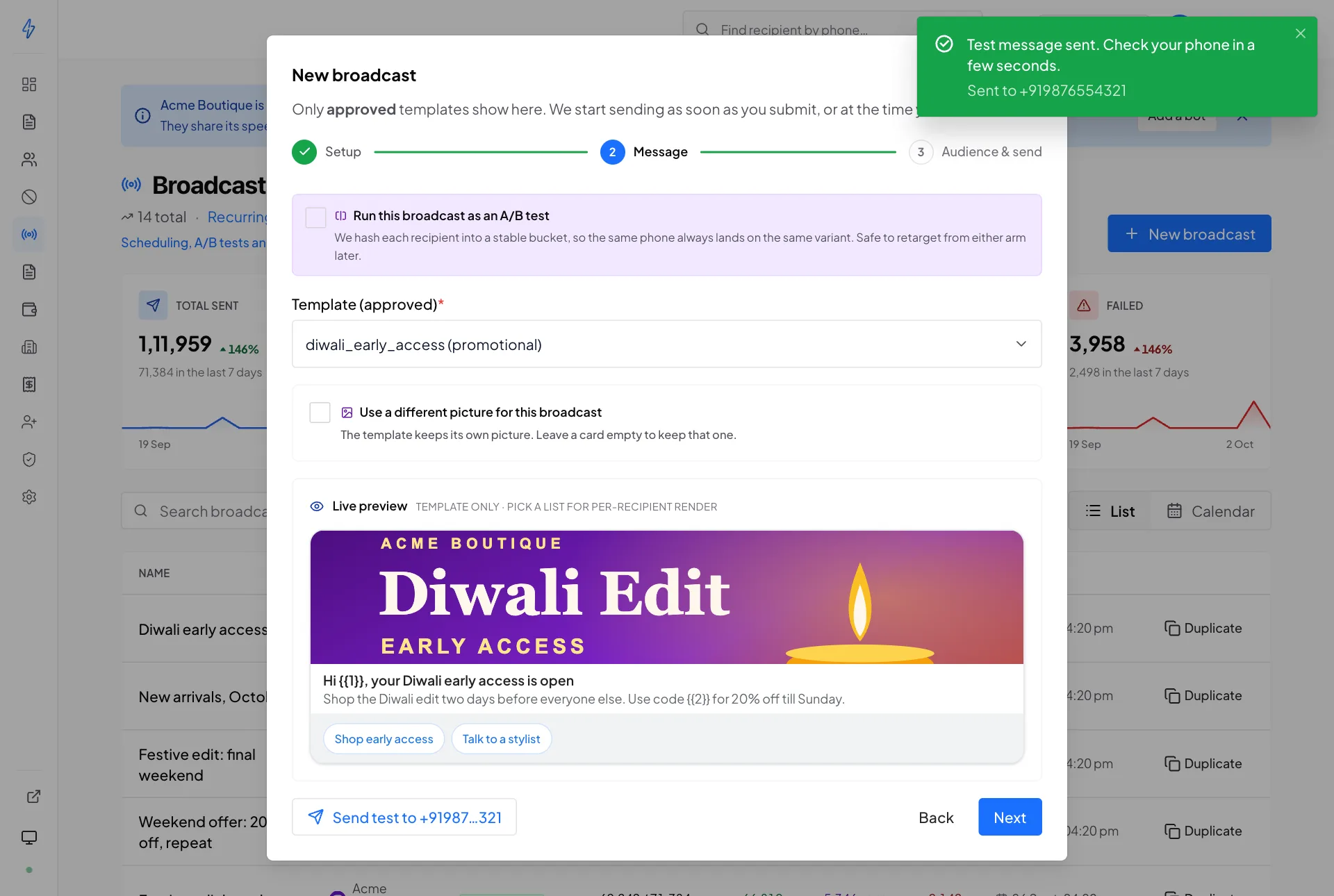
Response:
{ "success": true, "test_send_id": "…", "msg_id": "…", "phone": "+919876543210" }Status transitions arrive on the SSE stream as test_send.status
events, and the composer's history endpoint is
GET /api/v1/rcs/test-sends?limit=20. Full schema on the
templates page.
Opt-out filter
Every broadcast filters recipients through the account's opt-out list at prep time. Matches never enter the send pool, and the broadcast row surfaces the count:
{
  "broadcast_id": "…",
  "total_count": 99923,
  "sent_count": 99923,
  "optout_skipped_count": 77
}
The filter is a snapshot at prep time, opt-outs added while a
broadcast is running do not retro-actively skip queued targets.
POST /api/v1/rcs/messages/send also rejects with a 403 recipient_opted_out when the recipient is on the caller's list.
Reachability filter
Who a broadcast sends to depends on its audience. The answers that
count come from the list's
reachability check,
whichever of your bots made it, and apply to broadcasts from every bot on
your account. While a check runs, and after one fails or stops part way,
the answers from the check before it still count, together with the
answers the new check has saved. A check is optional and never blocks a
send.
With rcs:
Only a bot that supports number checks can run a check, but a broadcast
from any other bot on your account skips the same numbers. A list never
checked goes to every number except the people who opted out (and, with
rcs, the 30-day skips). A number that cannot get RCS then fails, shows
in failed_count with its reason on Targets, and is not
charged. The same holds for every number all sends to.
The 30-day skip belongs to one bot and applies only to rcs. A number is
remembered only when the
broadcast it failed on delivered at least one message, and another
failure on the same bot starts the 30 days again. Your other bots still
send to it. Single messages from send message
and test sends are not skipped and do not add numbers to it.
Skipped numbers are not messaged and not charged, and the broadcast row counts them:
{
  "broadcast_id": "…",
  "total_count": 1008,
  "optout_skipped_count": 12,
  "unreachable_skipped_count": 180
}
Like the opt-out filter, it is applied when the recipients are
prepared, with the answers saved at that moment. An audience that
reaches nobody is refused at Create and Start with
no_reachable_recipients.
A/B testing
Set ab_test: true in the create body to run the broadcast as an A/B
test. Each recipient is put in a fixed 0 to 99 slot and gets variant
"A" or "B" by ab_split_ratio. Each variant sends its own template
and keeps its own counters, which GET /rcs/broadcasts/{id} returns in
an ab block.
Create body
POST /api/v1/rcs/broadcasts
{
  "name":            "May launch, A/B",
  "bot_id":          "3c9…",
  "list_id":         "9ff…",

  "ab_test":         true,
  "ab_template_a":   "48b…",
  "ab_template_b":   "7de…",
  "ab_split_ratio":  50
}
When ab_test is true, template_id is optional and, if supplied,
ignored, ab_template_a becomes the canonical template on the
broadcast row. Both templates must be effectively approved; an
un-approved variant returns 403 template_not_approved.
Detail response
{
  "success": true,
  "broadcast": {
    "broadcast_id": "…",
    "ab_test": true,
    "ab": {
      "split_ratio": 50,
      "variant_a": {
        "template_id": "48b…", "template_name": "Launch v1",
        "sent": 5000, "delivered": 4880, "read": 3120,
        "clicked": 620, "failed": 12,
        "ctr": 12.7
      },
      "variant_b": {
        "template_id": "7de…", "template_name": "Launch v2",
        "sent": 5000, "delivered": 4901, "read": 3245,
        "clicked": 785, "failed": 8,
        "ctr": 16.0
      },
      "winner": "B",
      "confidence": "significant"
    }
  }
}
confidence
insufficient_data, fewer than 500 combined clicks (or either arm has 0 delivered).significant, Pearson two-proportion chi-square ≥ 3.841 (95% one- tail, df=1).not_significant, chi-square below the threshold.
Deterministic hashing
Bucketing is fnv32(phone) % 100 < ab_split_ratio → variant A,
otherwise B. The same phone always lands on the same variant across
retargeting from either arm, no split-brain if you rebuild the list.
SSE
broadcast.ab_result fires once when the broadcast completes:
{
  "type": "broadcast.ab_result",
  "data": {
    "broadcast_id": "…",
    "winner": "B",
    "confidence": "significant"
  }
}
Retargeting
Turn any subset of a broadcast's recipients into a fresh contact list, ready to feed straight back into a new broadcast.
POST /api/v1/rcs/broadcasts/{id}/retarget
{
  "subset":         "clickers",
  "new_list_name":  "May clickers"
}
Subsets
Response
{
  "success":              true,
  "new_list_id":          "b3c…",
  "new_list_name":        "May clickers",
  "member_count":         620,
  "dropped_optout_count": 4
}
Notes
- Opt-outs are honoured: phones on your opt-out list are left out
and counted in
dropped_optout_count. - Without
new_list_name, the list is namedRetarget: <broadcast name>: <subset>. - The new list is an ordinary contact list, so it's editable via the standard contact-list endpoints.
- Member rows carry
extra.source = "retarget"andextra.source_broadcast_id. - Retarget only builds a list, so the daily spend limit does not refuse it.
When nobody matches, it answers HTTP 400 and makes no list:
{
  "success": false,
  "code": "no_recipients",
  "message": "No recipients matched this subset. Nothing to retarget.",
  "dropped_optout_count": 0
}
An unknown subset is 400 with the message
subset must be one of clickers | read_not_clicked | delivered_not_read | didnt_read | didnt_open | failed | reachable_only | custom.
A read of the recipients that fails is 503 targets_unavailable.
Panel UX
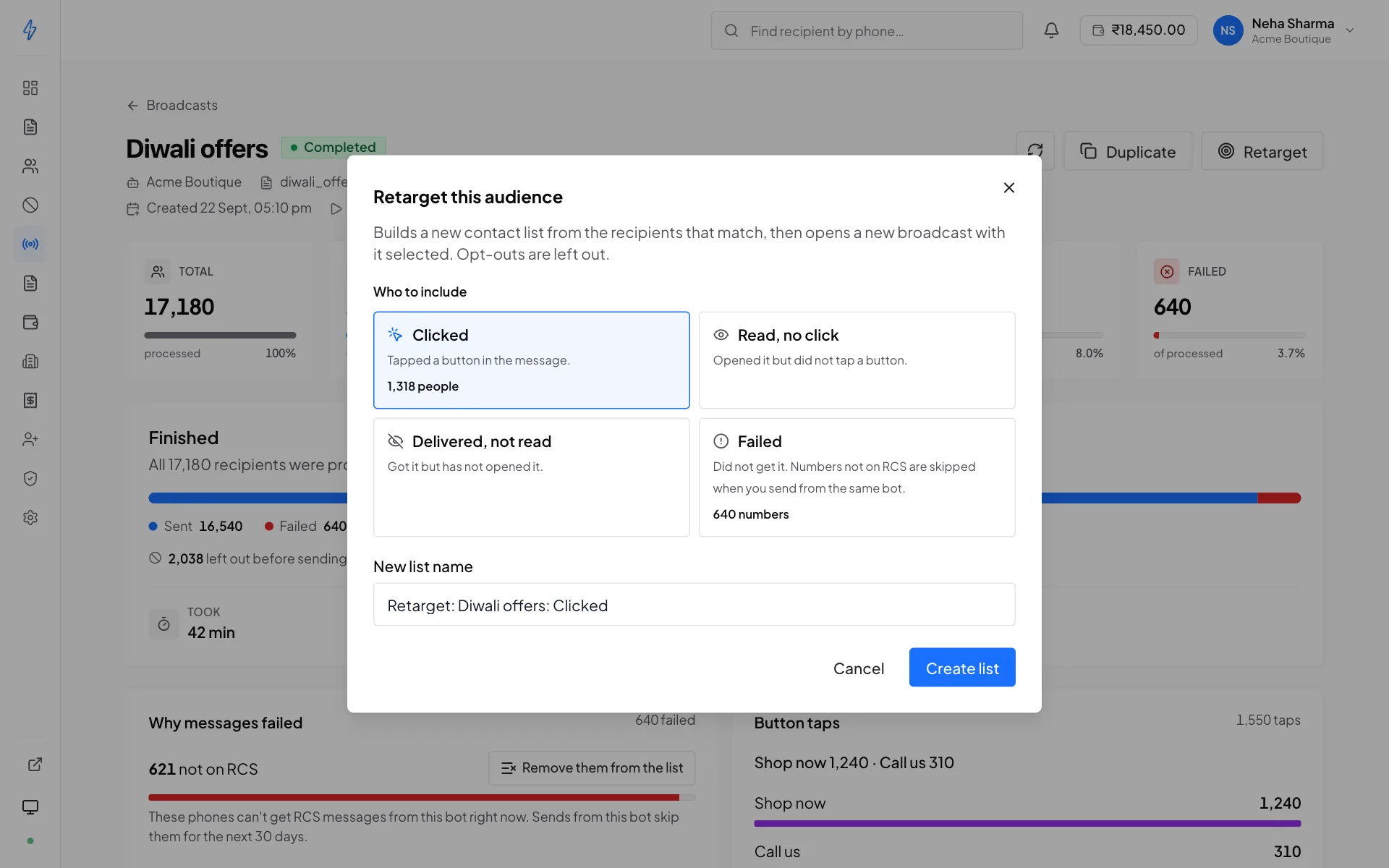
A running or completed broadcast's page has a Retarget button. It
offers four presets, Clicked (clickers), Read, no click
(read_not_clicked), Delivered, not read (delivered_not_read) and
Failed (failed), greys out a preset nobody is in, then drops you
into a new broadcast with the fresh list already selected.
Recurring broadcasts
See the dedicated Recurring broadcasts reference
for the cron schedule and how each run becomes a broadcast. A recurring
definition stores an audience too, and each run copies it to the
broadcast it makes and counts the list again.