
Webhooks
A webhook pushes what your bots do to a URL you control, as it happens, so your systems learn about a delivery or a reply without polling for it.
Go to Settings → Webhooks. Operators and owners can add and edit endpoints; every role can read them and their delivery history.
What you can subscribe to
Events fall into five families. Subscribe to whichever you actually act on: subscribing to everything and discarding most of it just makes your log noisy.
- Message events
message.sent,message.delivered,message.read,message.replied,message.clicked,message.failed, plus expiry and revoke outcomes. The highest-volume family by far.- Broadcast events
broadcast.started,broadcast.completed,broadcast.cancelled. Low volume and useful, one event per send rather than one per recipient.- Contact events
contact.opted_out,contact.opted_in. Subscribe to these if you keep consent state in your own CRM. They are how it stays in sync.- Bot and KYC events
bot.activated,bot.suspended,bot.reactivated, andkyc.submitted/kyc.approved/kyc.rejected. Useful for mirroring sender status into your own dashboards.- Template events
template.submitted,template.approved,template.rejected,template.needs_admin. Handy if your content pipeline waits on approval.
The API reference has the full list with the payload each one carries.
Adding an endpoint
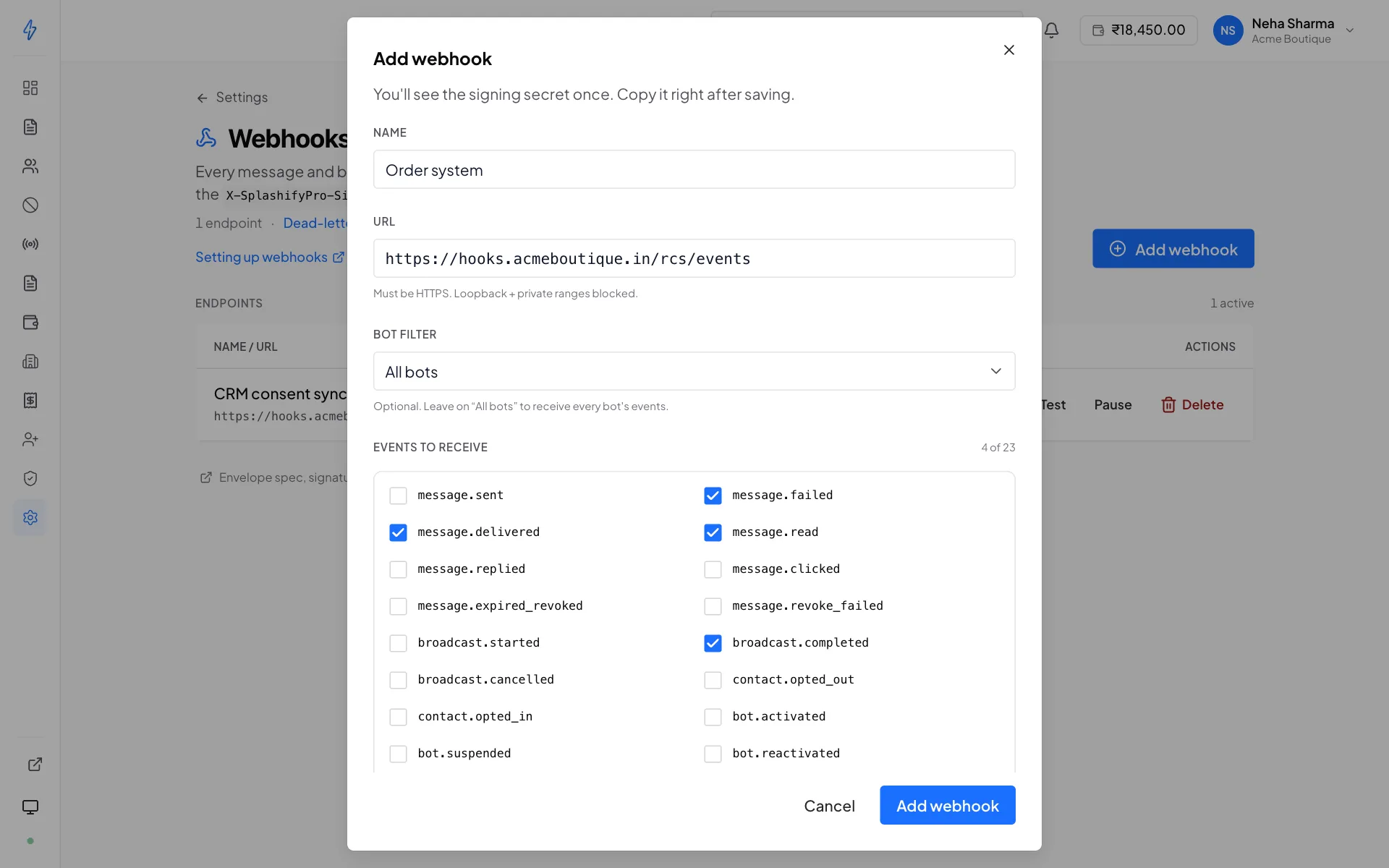
Give it a name and a URL
The URL must be
https://. Loopback and private addresses are rejected, the event has to reach a host we can actually connect to.Pick the events
Only what you will act on.
Optionally scope it to one bot
An endpoint scoped to a bot receives only that bot's events. Useful when different brands feed different systems.
Save, and copy the signing secret
It is shown once. Copy it before you close the dialog.
The signing secret is shown once
Copy it straight into your secret store. It is not recoverable afterwards, if you lose it, rotate it, which invalidates the old one immediately.
Verifying that an event is really from us
Every delivery carries three headers:
Verify the signature on every request
Your endpoint is a public URL. Anyone who finds it can POST to it. Computing the HMAC over the raw body and comparing it to the header, with a constant-time comparison, is what distinguishes a real event from a forged one. An endpoint that skips this is an endpoint anyone can feed fake deliveries and fake opt-ins.
The exact algorithm and a worked example are in the webhooks reference.
Testing before you rely on it
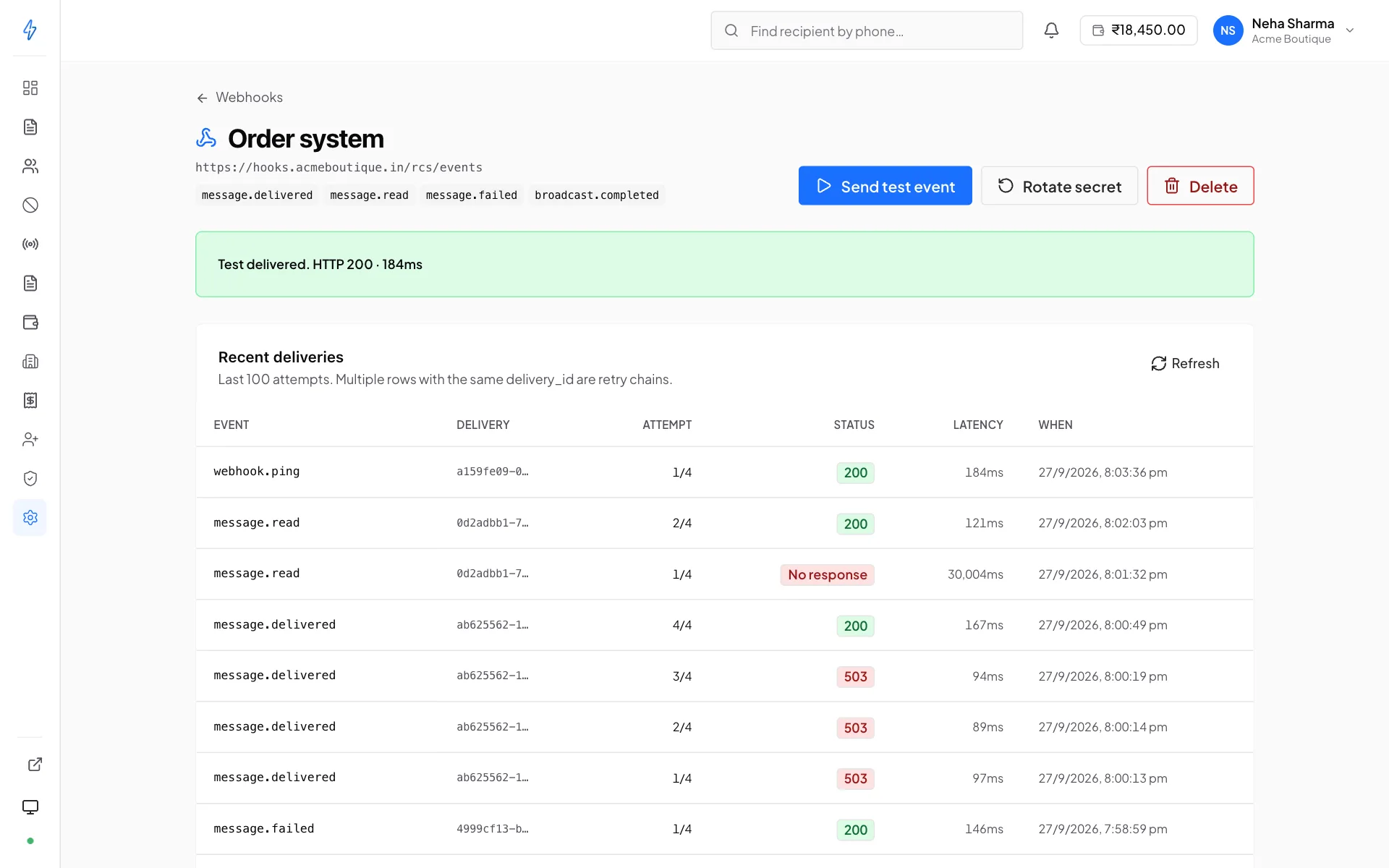
Test on the Webhooks list, or Send test event on an endpoint's own page, fires a synthetic ping straight at it, bypassing the retry queue, and shows you the status and latency it got back. It is the fastest way to check a new endpoint is reachable and that your signature check accepts our signature.
The ping is recorded in the Event log too, so you can inspect the payload afterwards.
Retries
A delivery that fails is retried three more times, at 1 second, 5 seconds and 30 seconds. Four attempts in total. Each attempt waits up to 12 seconds for your reply; no answer by then counts as a failure.
If all four fail, the event goes to the dead-letter queue with its full payload preserved, and is not retried again automatically. See Event log for reading and replaying it.
Reply 200 first, work afterwards
We wait 12 seconds for your reply. If your handler does real work before replying, writing to a database, calling another service, a slow dependency turns into a failed delivery. Acknowledge as soon as you have the payload, then process asynchronously.
Rotating the signing secret
Rotating issues a new secret and invalidates the old one immediately. Update your consumer before rotating, or the next event fails signature verification.
The symptom of getting this order wrong is a wall of 401s or 403s in the Event log, which is exactly where to look if it happens.
Firewalls
Outbound webhook requests come from Splashify's servers. If your endpoint sits behind an IP allowlist, allow the origin listed in the webhooks reference, an endpoint that silently drops our requests looks identical to one that is down.
Building a consumer that behaves
- Be idempotent
A retry, or a replay from the dead-letter queue, delivers an event your server may already have partially processed. Deduplicate on the delivery id.
- Do not assume ordering
message.deliveredandmessage.readfor the same message can arrive in either order. Order by the timestamp in the payload, not by arrival.- Tolerate unknown fields
New fields get added to payloads. A consumer that rejects anything it does not recognise breaks on an improvement.
- Return 200 for events you ignore
A 404 or a 500 for an event type you do not handle looks like a failure and burns the retry budget.