
Authentication
The API accepts two kinds of bearer token on the same header. Both resolve to the same account; pick whichever suits the caller.
Use a JWT when a human's credentials are behind the call. Use an API key when a headless backend polls or fans out reads, so nobody's password is sitting in a config file.
Option A, JWT
Exchange an email and password for a token, then send that token on every subsequent request.
/api/v1/rcs/auth/login
POST /api/v1/rcs/auth/login
Content-Type: application/json

{
  "email":    "[email protected]",
  "password": "your-password"
}{
"success": true,
"token": "eyJhbGciOiJIUzI1Ni...",
"role": "owner",
"user": {
"user_id": "aaaa-bbbb…",
"email": "[email protected]",
"account_label": "Acme Corp",
"member_id": "",
"assigned_bots": ["*"]
}
}Then, on everything else:
GET /api/v1/rcs/bots
Authorization: Bearer eyJhbGciOiJIUzI1Ni...
The token is valid for 7 days. There is no refresh endpoint, call
/auth/login again before it expires. A missing or expired token returns:
{ "success": false, "message": "unauthorized" }Changing or resetting the password invalidates every existing token for that person immediately, including the one making the change.
Two more fields login may want
Neither is required to get started, and both are ignored when the corresponding feature is off, but a client that omits them will break for some users.
If the account has a second factor, login answers 200 with no token:
{ "success": true, "requires_2fa": true,
  "message": "Enter the 6-digit code from your authenticator app." }
Re-post the same email and password with totp_code added, the challenge
is stateless, so there is no intermediate token to carry and nothing expires
while the user finds their phone. A recovery code works in the same field.
Failed sign-ins are counted per account
Wrong passwords and wrong codes are throttled against the EMAIL being attempted, not the calling
IP, an attacker can change where they come from, but not which account they are trying to open.
Ten wrong passwords, or five wrong codes, and that address answers 429 too_many_attempts for
fifteen minutes. A successful sign-in clears the counter, so a user who fumbles once and then
succeeds carries nothing forward.
What the token carries
{
  "type":    "rcs_user",
  "user_id": "<owner uuid>",
  "email":   "[email protected]",
  "mid":     "<member uuid | empty for the owner>",
  "role":    "owner | operator | viewer",
  "bots":    ["*"] | ["bot-uuid-1", "bot-uuid-2"],
  "iat":     1717320000,
  "exp":     1717924800
}
user_id is always the owner's id, even when a team member is calling:
every data query keys on the account, and mid plus role describe who inside
it is asking. bots: ["*"] means every bot on the account, including ones
created later.
Do not trust these claims client-side
The claims are readable because a JWT is only signed, not encrypted. Use them to render UI, never to decide access, the server re-derives role and scope on every request, and a tampered token fails signature verification before any handler sees it.
Accounts that belong to more than one company
An email can own one account and be a member of others. When that is the case, login cannot know which account you meant, so it returns a picker instead of a token:
{
  "success":           true,
  "need_account_pick": true,
  "session_token":     "eyJhbGciOi…",
  "accounts": [
    { "account_id": "aaaa…", "role": "owner",    "label": "Acme Corp" },
    { "account_id": "bbbb…", "role": "operator", "label": "Beta Inc", "member_id": "bbmm…" }
  ]
}
Exchange the session token plus a chosen account for the real JWT:
/api/v1/rcs/auth/select-account
POST /api/v1/rcs/auth/select-account
Content-Type: application/json

{ "session_token": "eyJhbGciOi…", "account_id": "bbbb…" }
The session token lives 15 minutes and grants nothing but account
selection. Handle need_account_pick even if you expect one account today:
it starts appearing the moment somebody accepts an invite with that email.
Two-factor sign-in
Accounts with 2FA enabled return a challenge from /auth/login rather than a token, and complete
the exchange with the authenticator code. If your integration signs in as a human whose account
has 2FA on, use an API key instead, see Security.
Option B, API keys
Keys are the server-to-server path. They never expire until revoked, and the raw material never leaves your servers after issuance.
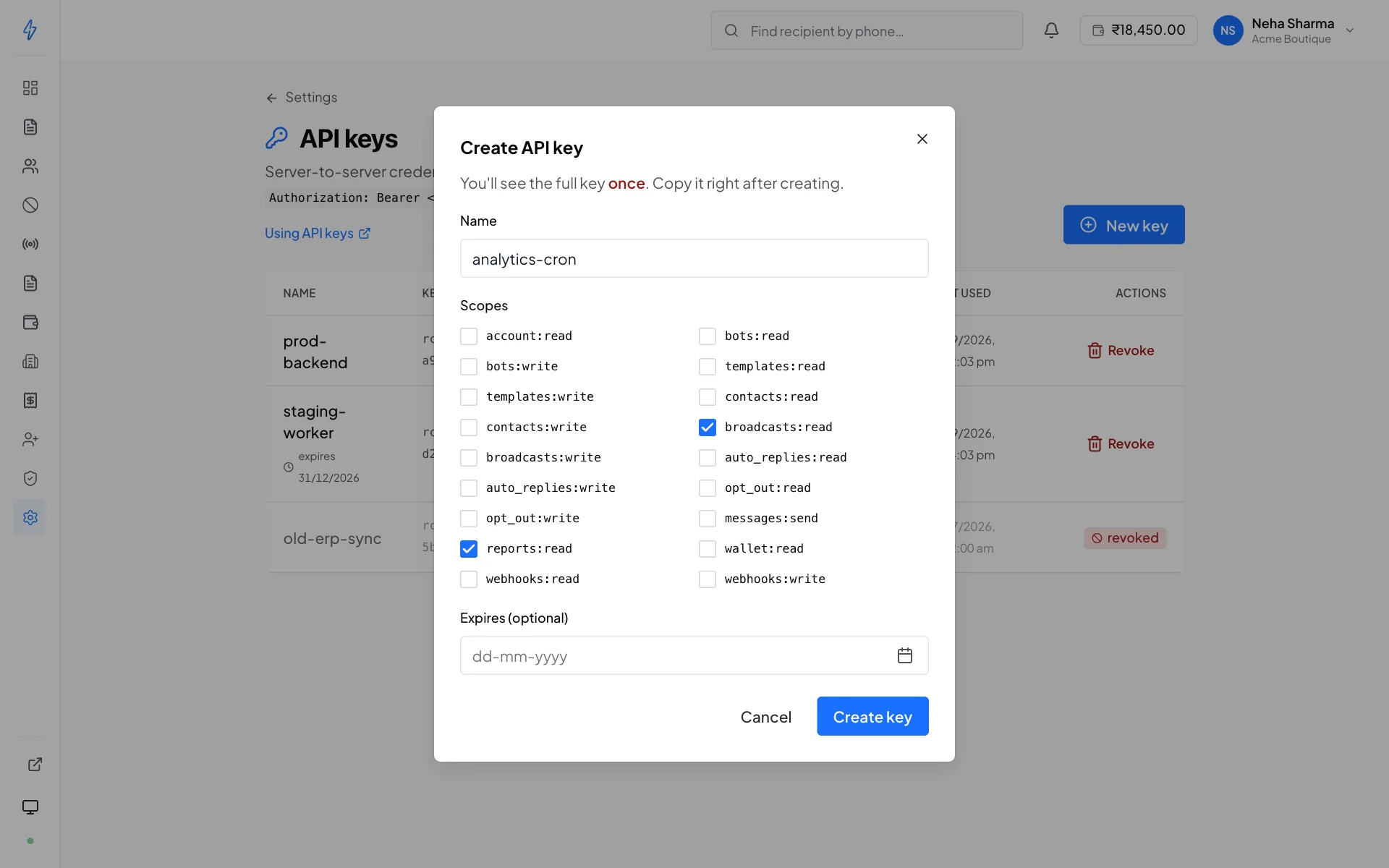
Create one in the panel at Settings → API keys → New key, or over the API:
/api/v1/rcs/api-keys
POST /api/v1/rcs/api-keys
Authorization: Bearer <jwt>
Content-Type: application/json

{
  "name":       "prod-backend",
  "scopes":     ["broadcasts:read", "contacts:read"],
  "expires_at": "2027-01-01T00:00:00Z"
}
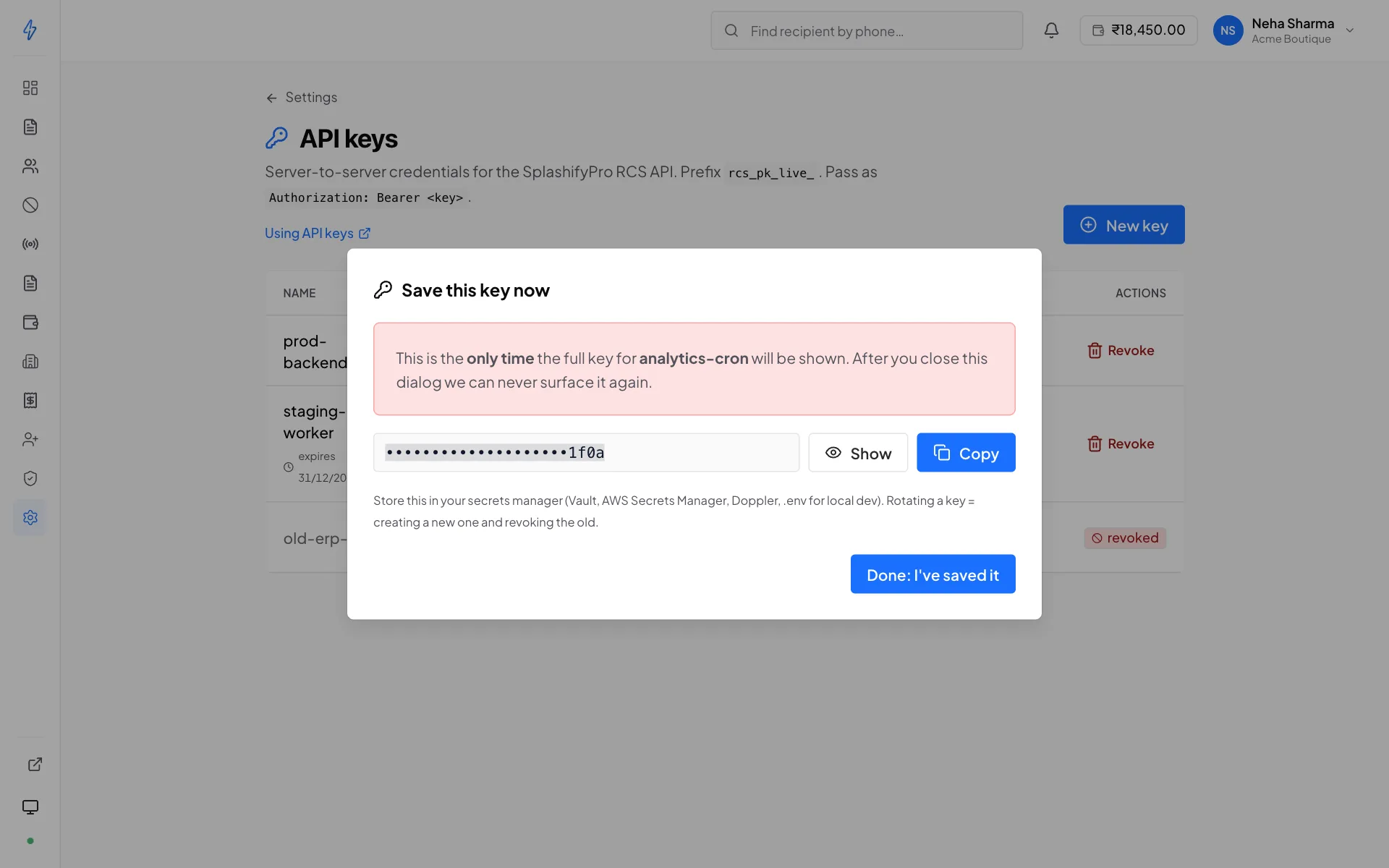
The response is the only time the raw key is ever shown:
{
  "success": true,
  "key_id":  "e8bb61e0-8500-11ef-9c9a-4bc60d7a1e2f",
  "raw_key": "rcs_pk_live_9f2b7ea4d6c1f8b0e3a5d24c6b8e1f0a",
  "warning": "This is the only time the full key will be shown. Copy it now."
}
Copy it now, or mint another
What we store is the SHA-256 hash plus the last four characters, enough to authenticate you and to label the row in the panel, not enough to reconstruct the key. There is no "show key" endpoint and support cannot recover it. If you lose it, revoke that key and create a new one.
Use it exactly like the JWT:
GET /api/v1/rcs/bots
Authorization: Bearer rcs_pk_live_9f2b7ea4d6c1f8b0e3a5d24c6b8e1f0a
Read-only, for now
In this release keys are accepted on GET requests to:
/api/v1/rcs/bots/api/v1/rcs/templates/api/v1/rcs/contact-lists/api/v1/rcs/broadcastsand/api/v1/rcs/broadcasts/{id}/api/v1/rcs/auto-replies/{bot_id}/api/v1/rcs/webhooks
Reaching one of these still requires the matching scope from the table below. The path list says what a key may reach at all; the scope says whether your key may.
Any other method or path with a key returns:
{
  "success": false,
  "code":    "api_key_endpoint_not_allowed",
  "message": "This endpoint cannot be used with an API key. Account security and payment actions need a signed-in session."
}
Keys read and write. Which of the two a request needs is decided by the
verb as well as the path, so a key holding only templates:read cannot delete
a template by pointing DELETE at the same URL it is allowed to GET.
Scopes
A write scope satisfies the matching read: broadcasts:write also grants
broadcasts:read, because a key that can start a broadcast but not check
whether it worked is not useful. messages:send has no read half and is
satisfied by nothing else.
Recipient phone numbers need contacts:read
Some paths hang off one resource but return the personal data of another. They
require contacts:read, the scope that means "this key may see who your
customers are", regardless of which resource they sit under:
GET /broadcasts/{id}/targetsGET /auto-replies/{bot_id}/firesGET /reports/messagesand/reports/messages/{id}/previewGET /recipients/{phone}
A key issued to a vendor for delivery statistics therefore cannot read every consumer number your bot has ever touched.
What a key can never do
These need a signed-in session, at any scope:
Requests to any of them return 403 with code: "api_key_endpoint_not_allowed".
Calling an endpoint the key does not hold a scope for:
{
  "success": false,
  "code":    "missing_scope",
  "message": "This API key does not have the required scope: broadcasts:read"
}
Rate limit
Each key is its own 300 requests/second token bucket, keyed on a hash of
the key, so the key itself is never stored anywhere. Exceeding it returns
429 with a Retry-After: 1 header:
{ "success": false, "message": "Rate limit exceeded. 300 requests/second per key" }Because the bucket is per key rather than per account, giving each service its own key stops a runaway script in one from starving the others.
Managing keys
Key management is JWT-only. You cannot mint or revoke a key using another key. That is deliberate: a leaked key then cannot be used to entrench itself.
/api/v1/rcs/api-keys
/api/v1/rcs/api-keys
/api/v1/rcs/api-keys/{key_id}
/api/v1/rcs/api-keys/{key_id}
GET returns active and revoked keys plus the list of scopes the panel offers:
{
  "success": true,
  "keys": [
    {
      "key_id":       "e8bb61e0-…",
      "name":         "prod-backend",
      "prefix":       "rcs_pk_live_",
      "last_four":    "1f0a",
      "scopes":       ["broadcasts:read", "contacts:read"],
      "created_at":   "2026-07-16T18:07:52Z",
      "created_by":   "[email protected]",
      "last_used_at": "2026-08-25T04:11:09Z",
      "expires_at":   "2027-01-01T00:00:00Z",
      "revoked":      false
    }
  ],
  "available_scopes": [
    "broadcasts:read", "broadcasts:write",
    "contacts:read", "contacts:write",
    "auto_replies:read",
    "webhooks:read", "webhooks:write"
  ]
}
PATCH renames a key or changes its expiry. It cannot change scopes. DELETE
soft-revokes: the row stays visible in the panel for audit, and the next
request using that key gets 401 Invalid or revoked API key. Revocation takes
effect immediately, with no cache to wait out.
Rotating without downtime
No hot-swap window is needed, because both keys are valid at once:
Mint the replacement
POST /rcs/api-keyswith the same scopes and a new name. Grabraw_keyfrom the response.Deploy it
Push the new key to your secret store and roll your servers. Both keys authenticate during the rollout, so no request fails mid-deploy.
Confirm the old key is idle
GET /rcs/api-keysand checklast_used_aton the old row. Once it stops advancing, nothing is still using it. The field is debounced to at most one write per minute per key, so give it a couple of minutes before trusting it.Revoke the old key
DELETE /rcs/api-keys/{old_key_id}.
Name keys after where they run
prod-backend, staging-worker, analytics-cron, not key1. last_used_at only tells you a
key is dormant; the name is what tells you whether revoking it is safe.
Which credential should I use?
- A backend service that polls broadcast results
API key, scoped
broadcasts:read. No password in your config, its own rate-limit bucket, and revocable without touching anyone's login.- A script that creates broadcasts on a schedule
JWT, writes are not yet available on keys. Store the credentials in a secret manager and re-login when the 7 days lapse.
- A dashboard your team signs in to
JWT, obtained with each user's own credentials, so the role and bot scope in the token match what that person is allowed to see.
- Anything at all, from browser JavaScript
Neither. Both credential types grant full account access and neither is safe in a client bundle. Proxy through your own backend.