
How RCS works
Five minutes of background that makes the rest of the panel make sense, especially why sender approval takes days and why some numbers cannot be reached.
RCS, Rich Communication Services, is the messaging standard that replaces SMS inside Google Messages on Android. From the recipient's side it is the same inbox they already use; the difference is what a business can put in it.
RCS compared with SMS
The read and click receipts are the part that usually changes how teams work. With SMS you know a message left the building. With RCS you know it was opened and which button was pressed, which makes retargeting the people who did neither a normal part of a campaign rather than guesswork.
What "verified sender" means
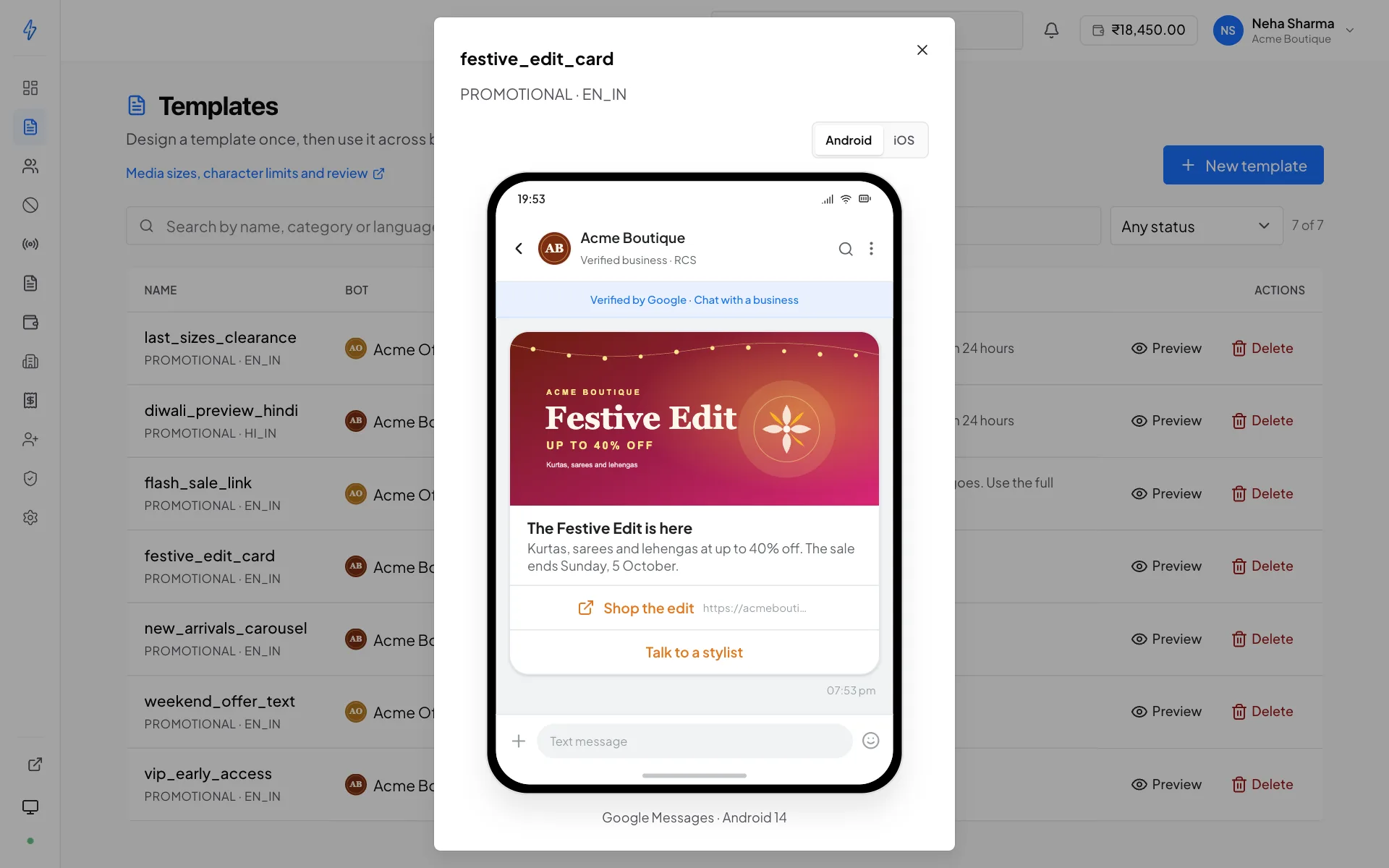
The brand identity is the whole point, and it is also why you cannot simply sign up and send.
Before your messages can carry your name and logo, the carrier verifies that you are who you claim to be. That review is what the bot application collects the evidence for, company registration, GSTIN, a live website, a real support number, published privacy and terms pages.
Why it takes days, not minutes
Approval involves a real review by people outside Splashify, at the carrier. Nothing on our side can shorten it. Submit on day one and build everything else while you wait, templates and contact lists can be prepared against a bot that is still pending.
Once approved, the recipient sees a verified badge next to your name. That badge is why RCS gets opened: it is a guarantee the message is not a phishing attempt wearing your brand.
The pieces, in order
- Agent (bot)
Your verified identity, name, logo, banner, colour, support contacts. This is what a recipient sees at the top of the conversation. In the panel it is called a bot.
- Template
A message blueprint tied to one bot. Reviewed before use so nothing unapproved goes out under a verified brand.
- Capability
Whether a particular phone number can actually receive RCS right now. Not every Android device has it enabled, and iPhones on most Indian carriers do not. See below.
- Delivery receipt
The carrier telling us the message arrived. Read and click receipts follow if the recipient opens it and taps something.
Who can receive RCS
This is the part that surprises people, so it is worth being blunt: not everyone on your list can receive an RCS message.
RCS requires the recipient to be on a device and carrier that support it, with the feature switched on. In practice that means most, but not all, Android users on major Indian networks. It excludes:
- Phones with RCS turned off in Google Messages
- Devices and carriers that have not rolled it out
- Numbers that have opted out of RCS at the device level
Check before you spend
When your account has a bot that supports number checks, you can probe a contact list to find out which of its numbers are reachable before running a broadcast against it, and export or re-list only those. On a cold list this is the difference between paying for a campaign and paying for a delivery-failure report. See Contact lists.
Checking one specific handset
To confirm a particular Android phone can receive RCS, your own, for a test send, check it on the device:
Open the Messages app and go to Settings
Tap the menu, then Settings.
Open Chat features and read the Status
Connected means RCS is active and that number can receive your messages. Anything else means it cannot, no matter what your list says.
This is worth doing once for your test number before you conclude a template is broken, a test send that never arrives on a handset with RCS switched off looks exactly like a send that failed.
There is no automatic SMS fallback in the panel. A message to an unreachable number fails with a clear reason and is refunded: it does not silently go out as an SMS at a different price. If you want a fallback, run it as a separate step against the numbers that failed.
What a message costs
You are charged for each message the network accepts, at the per-message price agreed for that bot. Different bots on the same account can carry different prices, and the panel shows your prices on Settings → Pricing.
A message the network refuses, or that goes to an opted-out recipient, is not charged. A message that the network accepted and later reports it could not deliver (an unreachable number, an expired or rejected message) is refunded automatically. See Wallet and billing for how the balance is drawn down and when.
Sending speed
Each bot has a TPS budget, transactions per second, set when it is activated. A broadcast is paced to stay inside it, which is why a large send finishes over minutes rather than instantly. Pushing past the budget is what produces gateway rate-limit errors, so the panel throttles rather than letting that happen.
If your sends are consistently slower than your campaign schedule needs, ask support to raise the TPS on that bot.
Opt-out is mandatory
Recipients can reply STOP to any RCS message from you, and that reply is honoured automatically, the number is added to that bot's opt-out list and excluded from every future broadcast from that bot. START re-subscribes them.
You cannot disable this, and you should not want to: sending to someone who has opted out is what gets a verified sender suspended. See Opt-out list.
The rules that come with the channel
Because RCS is a carrier channel with a verified identity attached, it carries obligations that SMS does not, a cap on how often you may message the same person promotionally, a time-of-day window, and a reputation score that moves the cap up or down.
None of them apply to transactional or OTP traffic, and all of them are worth reading before your first promotional campaign rather than after it fails.
Sending rules and limits
The promotional cap, the 7am–10pm window, reputation score, and billing categories.